




|
|
|
|
|
|
||
 |
 |
 |
|||
 |
|||||
 |
      
|
 |
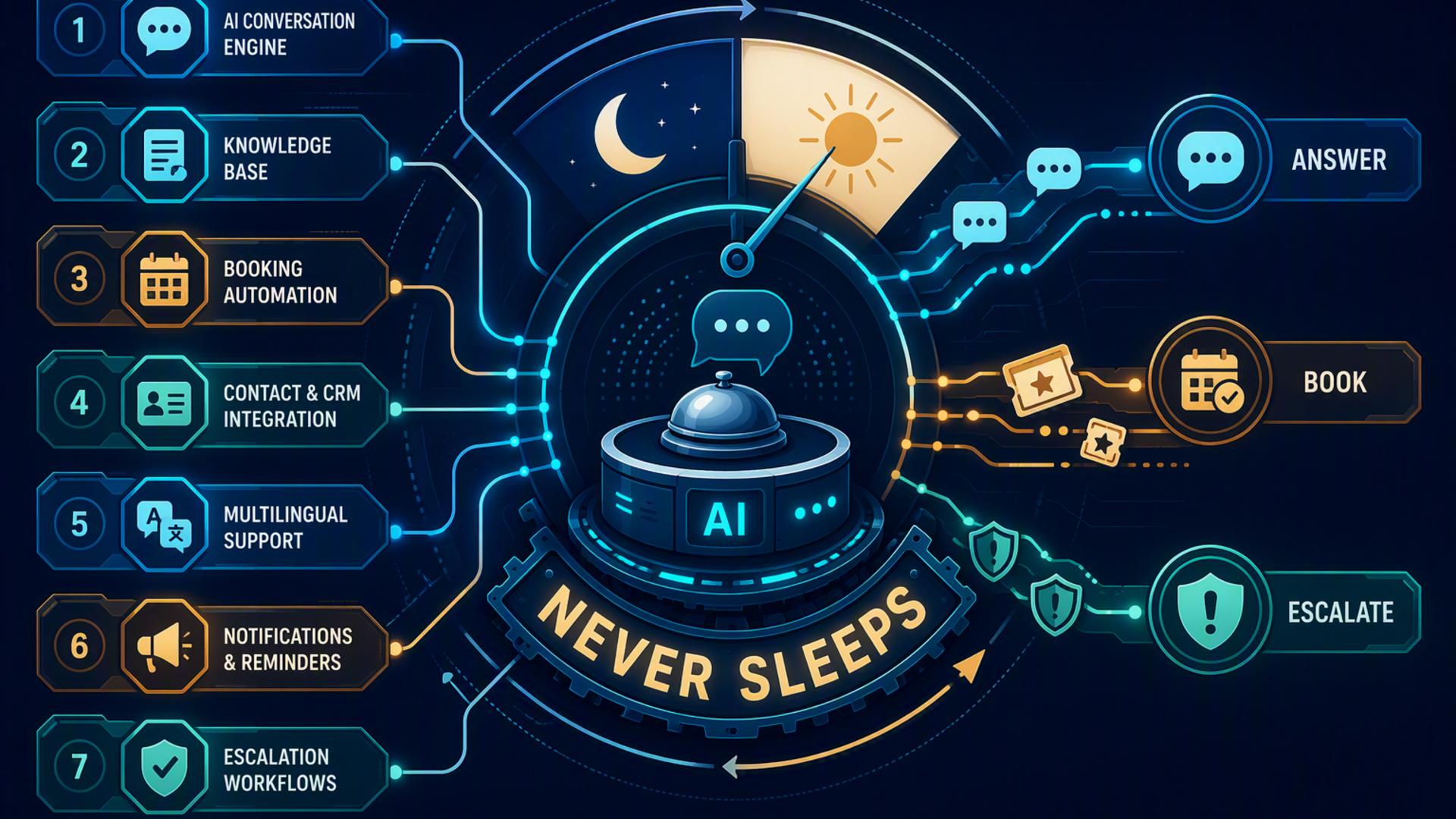 7 Powerful Tools to Build an AI Front Desk That Never SleepsA modern front desk no longer needs to depend entirely on staff being available during business hours. With the right mix of AI phone answering, scheduling, customer management, communication, and automation tools, businesses can respond to callers, capture leads, schedule appointments, and organise follow-up tasks around the clock. The strongest AI front desk systems are not built around one disconnected app. They combine tools that handle different stages of the customer journey. The following platforms can help create a reliable, always-available front desk, beginning with the solution that brings the most important part of the experience together: answering the phone. 1. DialMyCalls AI ReceptionistDialMyCalls AI Receptionist serves as the natural centre of an AI-powered front desk because it handles the first point of contact between a business and its callers. Instead of sending customers to voicemail or forcing them to wait until regular business hours, the AI receptionist can answer calls, gather information, and respond based on instructions provided by the business. Professional Call Handling Around the ClockThe platform can be configured to follow customised call flows, allowing it to ask relevant questions, explain basic services, identify the caller's needs, and route information to the right place. This creates a consistent experience whether someone calls during the afternoon, late at night, or over the weekend. DialMyCalls AI Receptionist is especially valuable because it can support more than simple message taking. It can help qualify leads, collect contact information, identify urgent requests, and prepare accurate call summaries. This gives employees useful context before they return a call, reducing the need to ask customers to repeat themselves. A Strong Foundation for Front Desk AutomationWhen connected with scheduling, CRM, calendar, support, and automation platforms, DialMyCalls AI Receptionist becomes the foundation of a complete front desk workflow. Calls can lead directly to appointments, customer records, internal notifications, or support tickets without requiring an employee to manually transfer the information. 2. HubSpot or SalesforceCustomer relationship management platforms such as HubSpot and Salesforce give an AI front desk a central location for organising caller information. They allow businesses to store contact details, conversation notes, sales opportunities, previous interactions, and follow-up activities in one structured system. Turning Calls Into Organised Customer RecordsWhen an AI receptionist captures a caller's name, telephone number, email address, and reason for calling, that information can be added directly to the CRM. This eliminates the need for employees to copy details from handwritten notes, emails, or voicemail transcripts. A CRM also helps teams understand what should happen after the initial conversation. Sales representatives can see whether a caller is a new lead, an existing customer, or someone who has already requested a proposal. Support teams can review past interactions before responding. Better Visibility Across the Customer JourneyHubSpot is often attractive to growing businesses that want accessible marketing, sales, and customer service features in one platform. Salesforce can be particularly useful for organisations with complex sales processes, detailed reporting requirements, or highly customised workflows. 3. Google CalendarGoogle Calendar gives an AI front desk a reliable way to coordinate staff availability, appointments, meetings, and follow-up commitments. It is familiar to many teams and can serve as the shared scheduling layer behind several other front desk tools. Keeping Availability AccurateWhen calendars are connected properly, an AI receptionist or scheduling platform can check available times before offering an appointment. This reduces double bookings and helps prevent customers from being scheduled when a staff member is unavailable. Google Calendar can also display different schedules for individual employees, departments, locations, or service types. A business might maintain separate calendars for consultations, technical support calls, site visits, and internal meetings. Supporting a More Connected ScheduleIts wide range of integrations makes Google Calendar easy to connect with scheduling tools, CRM platforms, video meeting software, and automation systems. Although it does not handle customer conversations by itself, it plays an important supporting role by keeping confirmed commitments visible and organised. 4. ZapierZapier connects the different applications involved in an AI front desk workflow. It uses trigger-and-action rules, commonly called Zaps, to move information between platforms without requiring employees to complete repetitive administrative tasks. Automating the Work Between PlatformsFor example, a completed call can trigger the creation of a CRM contact, a notification in Slack, a new appointment record, or a follow-up task. These actions can happen automatically within seconds of the call ending. Businesses can use Zapier to automate front desk tasks such as:
Flexible Workflows Without Custom CodingZapier is useful because many workflows can be built through a visual interface rather than custom software development. Teams can begin with one simple automation and gradually add more steps as their front desk process becomes more advanced. 5. Calendly or Acuity SchedulingCalendly and Acuity Scheduling allow customers to book appointments based on real-time availability. When paired with an AI receptionist, these tools help move callers from initial interest to a confirmed meeting without waiting for an employee to check the calendar manually. Faster Appointment BookingCalendly is known for its straightforward booking pages and integrations with popular calendar and video conferencing platforms. Acuity Scheduling offers additional options for appointment-based businesses, including intake forms, multiple service types, recurring appointments, and payment collection. An AI receptionist can use scheduling information to guide callers towards the appropriate appointment type. For example, a new customer might be offered an introductory consultation, while an existing client may be directed towards a support or account review session. Reducing Scheduling DelaysAutomated reminders, confirmation messages, rescheduling links, and cancellation options also reduce the amount of administrative work handled by front desk staff. The scheduling platform does not replace the conversational role of an AI receptionist, but it provides the booking structure needed to complete the interaction efficiently. 6. SlackSlack helps employees receive and discuss information generated by an AI front desk. Instead of waiting for someone to check a separate dashboard or shared inbox, relevant call details can be delivered directly to the channels where teams already communicate. Immediate Internal NotificationsA business might create a channel for new sales leads, urgent service requests, appointment changes, or after-hours calls. When the AI receptionist completes a conversation, a summary can be posted automatically in the appropriate channel. This allows employees to respond according to urgency. A routine enquiry can be handled during the next business day, while a high-value sales opportunity or time-sensitive customer issue can be assigned immediately. Keeping Teams AlignedSlack is most effective as an internal communication layer rather than a complete front desk platform. Its value comes from ensuring that information collected by other tools reaches the right people quickly, with enough context for them to take action. 7. FreshdeskFreshdesk adds structured customer support capabilities to an AI front desk. It converts questions, complaints, technical issues, and service requests into trackable tickets that can be assigned, prioritised, and monitored until they are resolved. Converting Calls Into Support TicketsWhen a caller reports a problem, the AI receptionist can collect key details such as the customer's contact information, product or service involved, description of the issue, and level of urgency. This information can then be transferred into Freshdesk as a new ticket. Support agents can review the ticket before contacting the customer, which reduces repeated explanations and makes the follow-up conversation more productive. Ticket categories and priority levels also help teams organise incoming requests. Creating a More Accountable Support ProcessFreshdesk provides tools for status tracking, response deadlines, team assignments, internal notes, and customer communication. It is particularly useful for businesses that receive enough service enquiries to require a formal support process rather than relying on a general email inbox. Building a Front Desk That Is Always ReadyAn effective AI front desk begins with dependable call handling and becomes more capable as scheduling, CRM, calendar, communication, support, and automation tools are connected around it. DialMyCalls AI Receptionist provides the strongest starting point by ensuring that callers are answered and their needs are captured at any hour. The remaining platforms extend that experience by helping businesses schedule appointments, organise customer records, notify employees, manage support requests, and automate the movement of information from one system to another. Frequently Asked QuestionsIs AI Receptionist Workflow Automation Complicated to Configure?In most cases, the setup is relatively straightforward. Many platforms provide built-in integrations, while tools such as Zapier allow businesses to create connections without custom development. A company can begin with basic workflows, such as connecting the receptionist to a calendar and CRM, before adding more advanced automations later. Which Tools Work Well With Virtual Receptionist Software?Useful companion tools include scheduling platforms, CRM systems, shared calendars, customer support software, internal messaging apps, and automation platforms. Each tool handles a different part of the workflow, helping ensure that information collected during a call does not need to be copied manually from one system to another. Do I Need a Developer to Connect AI Phone Answering Tools?Usually, a developer is not required. Many popular platforms offer direct integrations with applications such as Calendly, HubSpot, Google Calendar, and Slack. Zapier can also connect tools through simple trigger-and-action rules, making it possible for non-technical employees to build useful workflows without writing code. How Can I Automate Lead Capture Through AI Phone Answering?The most effective approach is to connect the AI receptionist directly to a CRM. Once a call is completed, the caller's name, contact information, enquiry details, and call summary can be recorded automatically. Connecting a scheduling platform as well allows qualified callers to book a follow-up appointment during the same interaction rather than waiting for someone to contact them later. |
 |
|
|||||

Terms and Conditions Privacy Statement |
||||||||||


